Anatomy of a Watch Report
The short version: the run of 6 August 2026 pulled 294 published notices and recommended two. The report shows every step in between. The run header records what was searched and how much came back. The shortlist scores what survived against your own evidence, and names the file behind every claim. The raw list gives the notices the filter set aside, and the reason for each. The coverage notes report any weakness the watch found in the search profile itself. The footer states where every fact came from. The complete example is free to download below.
Most tender alert services send a list of links. A list of links can't tell you what was searched, or what was discarded. It can't tell you whether the notice at the top is a genuine fit. Or just the one that happened to contain your keyword.
A Bidwin Watch report is written so all three can be checked. This page takes a real one apart, the run of 6 August 2026, and says what each part is for. You can download the report itself from the box partway down, or at the foot of the page.
About the example. A genuine Watch run, against a demonstration client called Kingsmede Skills & Employment Ltd. The client, its contracts and its evidence base are fictional and anonymised. The tender notices, buyers, values, deadlines and links are real. They are records retrieved from Find a Tender and Contracts Finder under the Open Government Licence.
Before the report: the watch that produced it
Watch runs on demand, whenever you want to know what is out there. It also runs on a schedule you set, for when you'd rather not have to remember. This client's watch sweeps twice a week, on Monday and Thursday mornings.
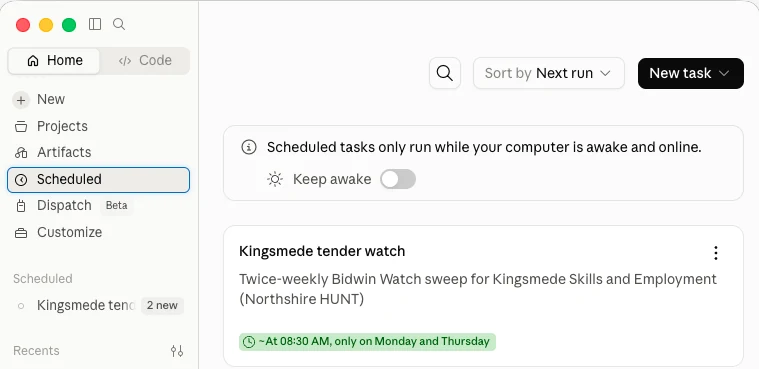
The schedule behind the example report, running in the client's own Claude account.
The run header records that cadence back to you, so the schedule and the report can be checked against each other. A scheduled run happens on your own machine, so it needs the computer awake and online at the time. A working morning is a better setting than an overnight one.
1. The run header: what was actually searched
The report opens with the search, not with an opportunity. It records the window covered and the portals queried. Then the counts: how many notices came back, how many touched the profile, how many survived deduplication, and how many passed the hard filter. On this run that chain ran 294 pulled, 12 touched, 9 after dedupe by OCID, and 4 through.
Publishing the funnel is what allows you to disagree with it. If 294 notices produce only four candidates, you can reasonably ask whether the filter is too tight. The raw list further down the report is what lets you check.
The header also records failures. This run covered seventeen days, not the usual four. The previous scheduled run had failed at retrieval when both portals returned an HTTP 429. It left the ledger untouched instead of recording notices it never saw. That gap was logged at the time, and closed by this run.
2. The scored shortlist: fit, and the evidence behind it
Each opportunity that passes the filter gets the same treatment. A fit score out of five, a recommended action, and the reasoning in full. The report labels the score as judgement, not fact. What keeps it from being a guess is the rule behind it: an opportunity is scored against your evidence base, not your ambitions. Stated ambition in your watch brief widens what the watch looks for. It never raises a score.
The top-scoring entry from this run is reproduced below, shortened. The evidence markers are left exactly as the report carries them.
Buyer: NHS Dorset Integrated Care Board, as a cluster with NHS Somerset and NHS Bath and North East Somerset, Swindon and Wiltshire
Value: £834,550 · Deadline: 28 August 2026, 17:00 (three weeks — viable)
Why it fits. This is the cohort Kingsmede is built around. [Support File: Kingsmede Capability Statement 2026.docx — "Who we are"] states the specialism as supported employment for people with disabilities and health conditions… The outcome evidence behind that is unusually specific: [Support File: Elmsworth Works Performance Report 2022-2026.docx — "Cohort outcomes"] records a 51% job outcome rate for participants with a disability or health condition, within four percentage points of the whole-cohort rate, and attributes it to health-adjusted caseloads.
The gap, and it is the real question. Delivery is Dorset, Somerset and BSW. [Support File: Employer Partnership Network 2026.docx — closing note] states plainly that the employer network is strongest in and around Elmsworth… Set that against a five-month initial term and the commercial question is sharp: can a locally recruited employer function be stood up fast enough to deliver outcomes inside five months, and will the cluster ICB contract with a provider mobilising from outside the region? Check that before committing bid resource.
Excerpt from the report of 6 August 2026. Support File markers appear in the working copy so every claim can be traced; they are stripped from anything you submit.
The excerpt shows three things.
- Every fit claim names its file and its section. The document, the heading and the figure, not a general assertion about track record. So a bid team can find the sentence behind any claim it intends to use.
- The qualifications sit alongside the case, under "what would strengthen it" and, here, a gap serious enough to change the decision. Take a four out of five that questions whether the initial term is long enough to mobilise in. Not a lead. A contribution to the bid/no-bid decision.
- The deadline is assessed, not printed. "Three weeks, viable" is a judgement about whether a response is realistic in the time available.
Low scores are treated the same way. A Get Work Ready programme in this run scored one out of five and was marked Skip. Not because the work was wrong. Because the buyer is in Northern Ireland, and the brief rules that out. The report records that the subject fit was excellent and irrelevant.
Read the whole report
Seven pages. The complete run of 6 August 2026, exactly as it was produced. No email required.
3. The raw list: the notices the filter set aside
Every notice that touched the profile and was then culled is published. The buyer, the matched CPV code, the deadline, the reason it was set aside, and its link or OCID. On this run that came to five notices, all dropped on geography.
If the filter is discarding something you'd have bid for, this is where you find out. Not six months later, when the award notice appears. Notices that matched nothing at all are counted but not itemised, which keeps the report readable. That was 282 of them on this run, mostly road schemes and IT contracts.
4. Coverage and profile notes: where the search itself is weak
The closing section covers the search itself. It confirms whether retrieval was complete. It records what has been stored, and reports any fault the watch has found in its own search profile. On this run both portals returned every page and nothing was truncated, with the page counts stated behind it.
One fault was found worth fixing. The region gate matched notices carrying ITL codes such as UKK2, or the literal word "England". It missed notices whose only geography was a plain regional name like "East Midlands", or a city like "London". Nothing was lost this cycle, because both affected notices were out of scope for other reasons. The report records that the mechanism will drop genuinely relevant English notices the moment a buyer publishes one with a plain regional name. It gives the one-line fix. Then it says: I have not made this edit; the profile is yours.
A data-quality problem at source is flagged in the same section. Contracts Finder had stamped countryName: England on a Northern Irish buyer. The report's conclusion: treat region data from that portal as indicative, and check geography against the buyer name.
5. The provenance footer: where every fact came from
The report closes by stating its own sourcing rules. Notice facts come only from the OCDS records retrieved in that run, under the Open Government Licence. Fit scores are judgement, and are labelled as such. Every fit claim cites the Support File behind it. Nothing has been estimated. And no link has been constructed where the published data did not carry one.
The last of those governs a practical case. Where a record carried no usable link, the report gives the OCID and the source portal, and asks you to search on it. It doesn't build a plausible URL from a pattern.
What happens next
Watch decides what is worth bidding for. Every recommended opportunity ends with the same offer: say the word and I'll build the tender project for this one, folder, evidence copied across, and a handover brief ready for the tender vet. Bidwin Core then turns the chosen opportunity into an evidence-cited first draft. Nothing is re-keyed between them.
What a Watch report cannot tell you
Watch sees published notices. It can't show you a contract that was never advertised, or an extension awarded quietly. Below-threshold notices on the devolved portals are not yet covered: Public Contracts Scotland, Sell2Wales and eTendersNI. Many Scottish and Welsh buyers do publish to Find a Tender as well. Fit scores are a professional judgement made against your files. They order your attention. They don't predict the outcome. The report is also only as good as the evidence base behind it. On this run the single strongest credential for one opportunity had to be flagged as an evidence gap. It appeared in the client's brief, but in none of their files.
Bidwin Watch example report
The full run of 6 August 2026, seven pages, free to download and share.
Figures on this page are taken from the Bidwin Watch run of 6 August 2026 and are reproduced in the downloadable report. Bidwin Watch uses public-sector procurement data from Find a Tender and Contracts Finder, published under the Open Government Licence v3. Last reviewed 6 August 2026.
See what is out there for you
Bidwin Watch scans the live portals and scores every opportunity against your evidence. Included free with Bidwin Core, for a limited time.
Get Bidwin →